Earning with the Affiliate Program
Share your referral link, track conversions, and request cash payouts for commissions.
The affiliate program pays you a percentage of the purchases made by users you refer — and every account is automatically an affiliate. There is no application: your referral link is live from the moment you sign up, and every purchase your referrals make earns you the standard commission rate. Commissions are cash, not credits — they accrue as a dollar balance on your account and are paid out by our team via Zelle, PayPal, Venmo, or another method you arrange. Everything runs from the Referrals tab under Dashboard → Account.
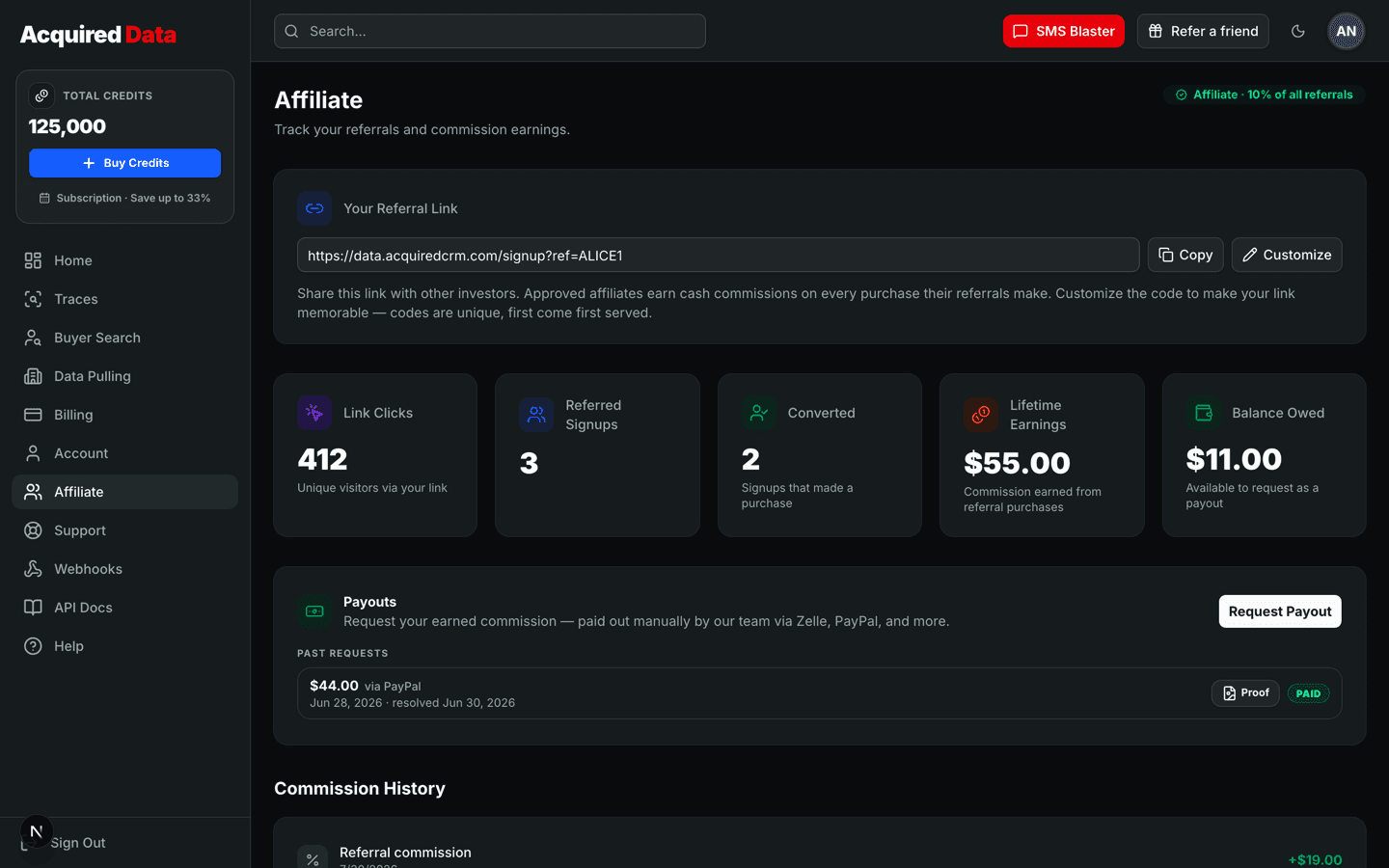
Your referral link
Your link appears at the top of the Referrals tab in the form https://…/signup?ref=YOURCODE, and a quick-copy version is always one click away behind the Refer a friend button in the dashboard header. Anyone who signs up through it is permanently attributed to you — each user has exactly one referrer, locked at signup, so there is no stealing or reassigning referrals later.
- Click Copy to grab the full link.
- Click Customize to change your code. Codes are 4–16 letters or numbers, are unique platform-wide (first come, first served), and old codes stop working the moment you change them — update any published links.
Your commission rate
Every account earns the standard commission rate on every purchase made by every user you refer, for as long as they stay customers. Your exact rate is shown on the Referrals tab ("You earn X% of your referrals' purchases") — it applies automatically, with no plan to pick and nothing to activate.
Tracking your performance
The Referrals tab shows live stats:
- Clicks — visits to your referral link.
- Signups — accounts created through it.
- Converted — referrals who have made a purchase.
- Lifetime earnings — total commission you have earned.
- Balance owed — earnings not yet paid out.
Note that if a referred purchase is later refunded, its commission is clawed back — your balance can briefly go negative, and new earnings restore it before adding to what you are owed.
Requesting a payout
- Click Request Payout on the Referrals tab.
- Enter an amount — anything up to your current balance, in whole cents. It defaults to the full balance.
- Choose a method (Zelle, PayPal, Venmo, or Other) and enter the handle or email where the money should go. For "Other", describe how to pay you (for example, wire instructions).
- Optionally add a note, then submit.
You can have one pending request at a time, and you can cancel it yourself while it is still pending. Payouts are processed manually by our team; when a request is marked paid, proof of payment is attached and viewable from your payout history.
Payout statuses
| Status | Meaning |
|---|---|
| Pending | Submitted and awaiting processing by our team. |
| Paid | Money sent — proof of payment is attached to the request. |
| Rejected | Not paid, usually with a note explaining why (for example, a balance change from a refund). |
| Canceled | You withdrew the request before it was processed. |
New to the platform yourself? Start with the getting-started guide so you can speak to the product first-hand, and see credits and billing for what your referrals will be buying. Questions about a commission or payout? Open a support ticket.
Keep reading
How Credits and Billing Work
Credit packs vs monthly subscriptions, the two credit buckets, fees, invoices, and exactly when credits are refunded.
Read →Account & BillingAccount Settings and Security
Update your profile, change your password, switch themes, and understand how sign-in security works.
Read →Account & BillingGetting Help and Submitting Tickets
Open a support ticket from the dashboard, track it to resolution, and know what to include.
Read →