Data Pulling: Building Property Lists
Build targeted property lists from a nationwide database with List Stacks, distress signals, and equity filters.
Data Pulling (Dashboard → Data Pulling) turns filters into a downloadable property list. It runs on our own nationwide property database — 130M+ properties covering every county, refreshed monthly — so there are no per-record data fees behind it. Every pull costs a flat 1 credit per record, subscribers get their plan's monthly credit amount as free records every billing period, and every record includes everything we know about the property: no add-ons, no dataset upcharges. When a pull finishes, one click sends the list into bulk skip tracing. The same pulls are also available through the property data API.
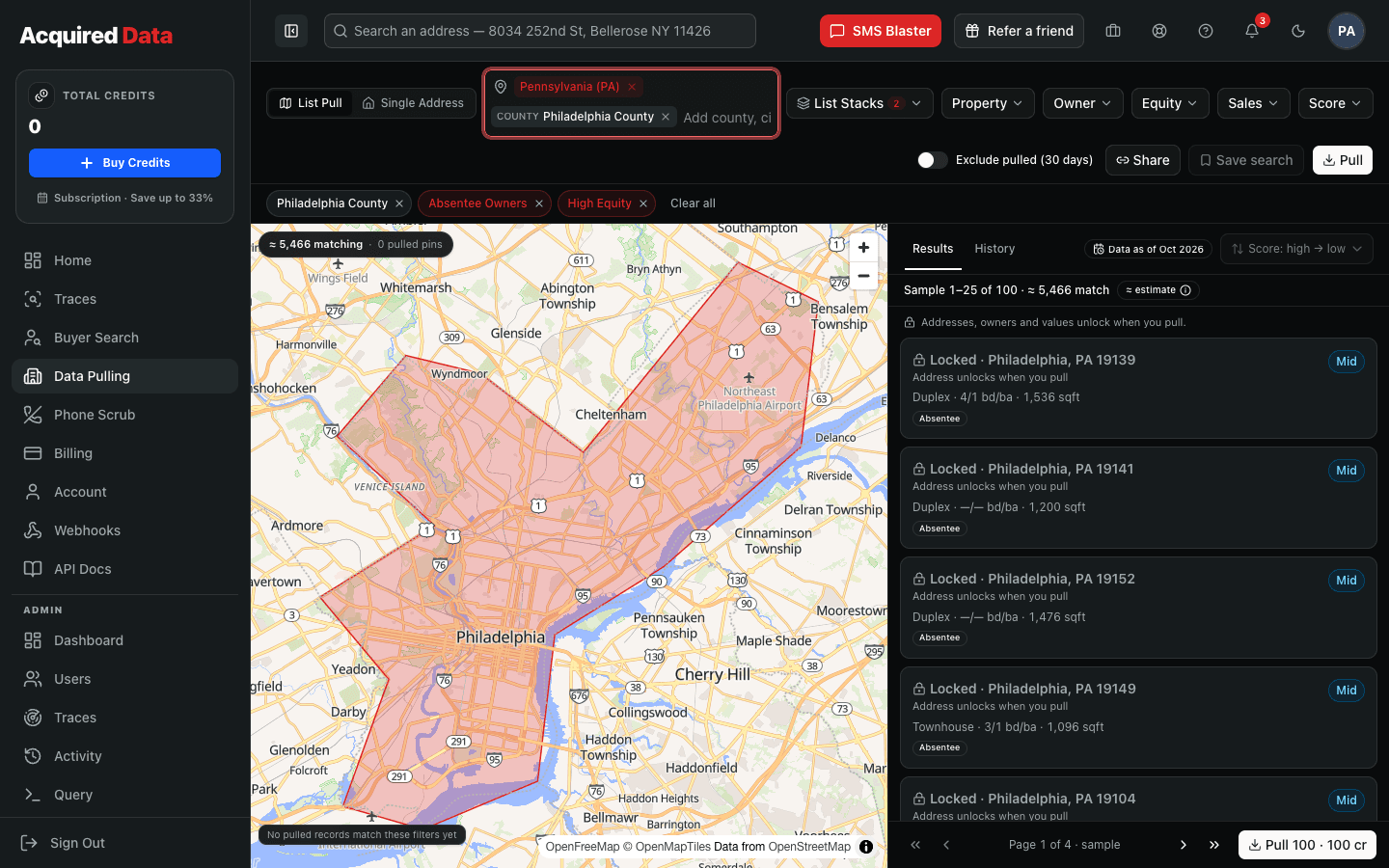
Step 1: Choose an area
Pick a state, then narrow with counties, cities, or ZIP codes. The map tints the area you have selected and the live match count updates with every change, so you can see how many properties fit before you spend anything. Broad areas are fine — the record cap (Step 4) controls how much you actually buy.
Step 2: Stack List Stacks
List Stacks are named presets that bundle the filters investors reach for most. They are grouped by who you are looking for:
- Buyers — Cash Buyers, Recent Buyers, Investors, Likely Flip, Multiple Property Owners.
- Sellers— Absentee Owners, High Equity, Free & Clear, Corporate Owned, Inherited, Pre-Foreclosure, Out-of-State Owners, Owner Occupied, Vacant, Long-Term Owners, Tax Delinquent, Tired Landlords, Aging Investor Portfolio, Distressed Equity, Free & Clear Absentee, Out-of-State Landlord, Portfolio Liquidation Candidate, Recent Inheritance + Equity, Likely Wholesale Candidate.
Select as many as you like and choose whether a record must match all of them (a tighter, higher-intent list) or any of them (a broader list). Distress signals sit alongside the stacks: pre-foreclosure, tax delinquent, involuntary lien, vacant, foreclosure document type, and auction within 30 days, 90 days, or 1 year.
Step 3: Fine-tune with filters
Every stack can be refined — or replaced — with individual filters:
- Property — type, beds, baths, square footage, year built, lot size, units, pool, mobile home.
- Owner — owner occupied or absentee, owner type (Individual or Corporate), out of state, inherited, years owned, portfolio size.
- Equity & financing— estimated value, equity %, DTV (debt-to-value), free & clear, open liens, lien rate, adjustable-rate or HELOC loans, AVM confidence.
- Sales — last sale date and price, cash purchase, recent buyer, long-term owner.
- Motivation Score — a 0–100 seller motivation score, explained per record, so you can keep only the top band.
Turn on Exclude previously pulled to skip records you pulled in the last 30 days; the summary also shows how many matches are new since your last pull.
Step 4: Preview, then pull
The results preview shows the matching records with the property type, city and ZIP, size, flags, and score band visible, while the address, owner name, and values stay locked until you pull. Very large areas show a 100-record sample. Set the number of records (up to 25,000 per list), name the list, and click Pull. The summary shows the cost in credits, how many of those records are covered by your free allowance, and your balance after — all before anything is charged.
What every record includes
There is nothing to add per record. Each pulled row contains:
- Property address, owner name, and owner mailing address
- Property details — type, beds, baths, square footage, year built, lot, units
- Estimated value, equity, and DTV
- Open liens and lender, plus deed and sale history
- Distress flags and quick-list flags
- The seller motivation score
Pricing
| Situation | Credits / record |
|---|---|
| Active subscription — records within your plan's monthly credit amount | Free (a 10,000-credit plan = 10,000 free records per period; 30,000 = 30,000) |
| Active subscription — records beyond the free allowance | 1 |
| No subscription | 1 |
- Free records reset every billing period and do not roll over.
- Credits are only charged for records actually delivered — if fewer match than you requested, the pull auto-adjusts.
- Automatic credit adjustments are separate from money refunds; credit purchases are non-refundable per the Terms. See Credits & Billing.
Step 5: Download or skip trace
- When the pull completes, choose Download CSV to save the list, or Skip trace these records.
- Skip trace opens Skip Tracing with the list already loaded and its columns mapped, starting on the Add-Ons step — pick your add-ons, review the cost, and run it.
- Every pull stays in the History tab with the same download and skip-trace options.
Property profiles
Need one property rather than a list? Dashboard → Properties searches any address or owner and opens a full profile: ownership and portfolio, equity and DTV, liens, transaction history, distress flags, and the motivation score with its reasons. Profiles are free for records you have already pulled; otherwise a profile uses one free record from your allowance, or 1 credit.
Automating pulls
Filtered pulls are also exposed through the property data API, so you can schedule recurring pulls or feed lists directly into your own pipeline at the same 1 credit per record, with the same free records on a subscription. Pair pulled seller lists with Buyer Search to line up dispositions in the same market.
Keep reading
Finding Cash Buyers Near a Property
Use Buyer Search to find flippers and landlords actively buying near your subject property.
Read →Getting StartedGetting Started
Create your account, add credits, and run your first skip trace — a five-minute tour of the platform.
Read →Skip TracingBulk Skip Tracing: Upload a List of Property Owners
Step-by-step walkthrough of the four-step bulk trace wizard, from CSV upload to downloading results.
Read →