From Pull to Skip Trace in One Click
How the pull → Add-Ons handoff works, when to add LLC & Trust resolution, how Exclude previously pulled keeps refreshes cheap, and automating the whole loop with the API.
The slowest part of most lead-gen pipelines isn't the data — it's the spreadsheet in between. Export from the list tool, open it, rename columns, delete the ones the tracer rejects, upload, map headers, hope nothing shifted. On Acquired Data that step doesn't exist: a finished Data Pulling list goes into skip tracing with one click, the columns already mapped, starting on the Add-Ons step. This post walks the handoff end to end, covers the two decisions you make on the way (which add-ons, and whether to resolve entities), explains how Exclude previously pulled keeps a recurring list cheap, and shows how to run the whole loop through the API.
The handoff
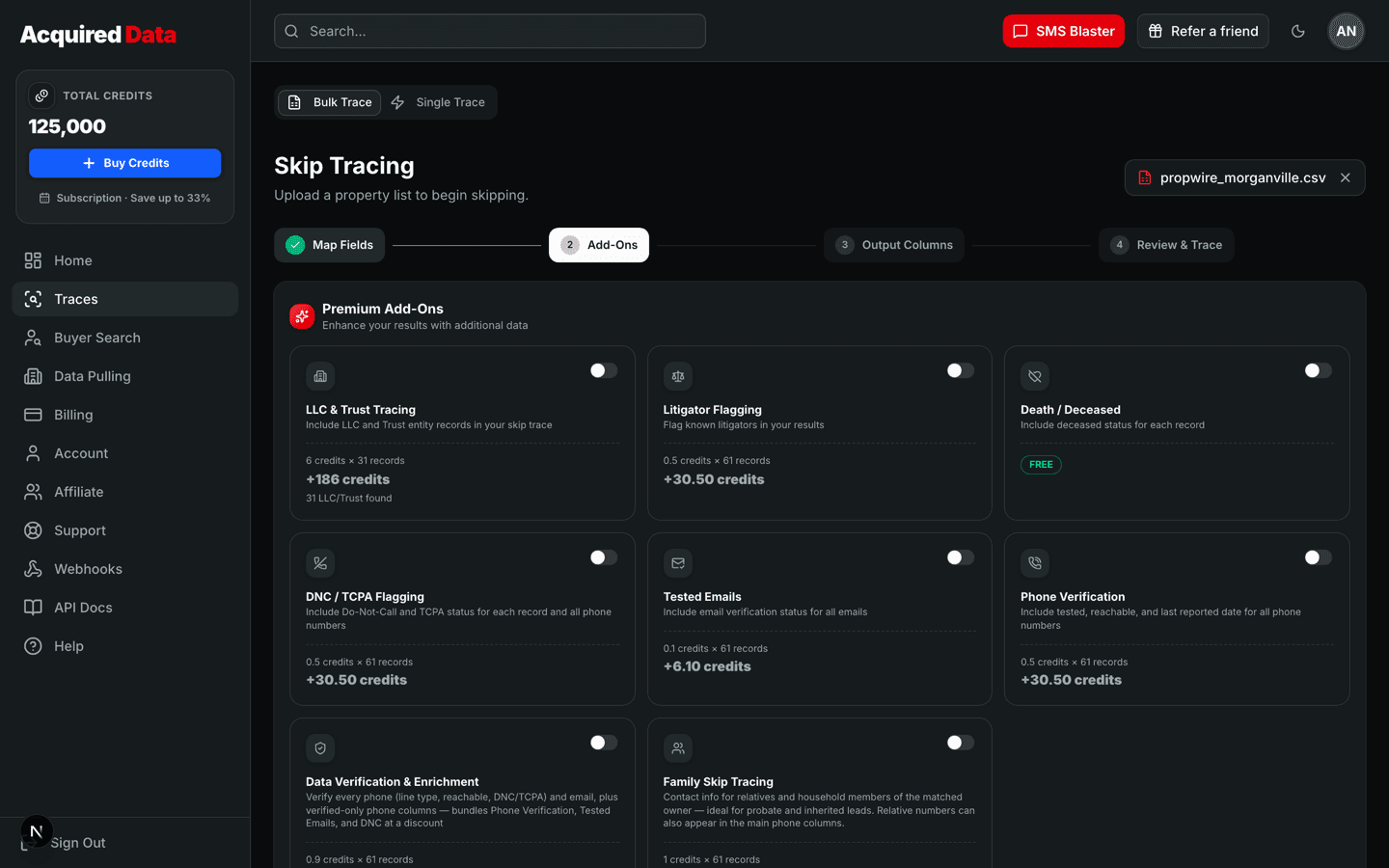
When a pull completes — in the builder or from the History tab — you get two buttons: Download CSV and Skip trace these records. The second opens Skip Tracing with the pulled list already loaded. Because the pull came from our own database, every column is already known: owner name, property address, city, state, ZIP, mailing address, owner type. The wizard skips the upload and mapping steps and lands you on Add-Ons, which is the first place a decision is needed. From there it's the normal flow: pick add-ons, choose output columns, review the cost, run.
- Pricing is the usual bulk rate — 1 credit per row for standard owners, with entity rows and add-ons priced on top and shown before you start. Pulled records that were free under your subscription allowance are free; the trace is a separate, normal charge.
- Nothing is lost. The pulled fields — estimated value, equity, DTV, liens, motivation score, flags — stay on the row through the trace, so the output CSV has both the underwriting data and the phone numbers.
- Every pull stays in History with the same two buttons, so you can trace a list today and trace a different slice of it next week.
Decision one: which add-ons
Add-ons are per-row and optional; the right set depends on how you'll reach out. The add-ons post goes deep, but for a pulled list the short version is:
- Calling or texting: DNC/TCPA flags and phone verification. You'll know before you dial which numbers are safe and which are live, SMS-capable lines.
- Email campaigns: tested emails, so the list doesn't bounce your sending domain into the spam folder.
- Direct mail only: often nothing — the pull already includes the owner mailing address, and a base trace gives you phones for the follow-up call when the letter lands.
The Data Verification bundle combines DNC, tested emails, and phone verification at a discount if you want all three. Whatever you pick, the review step shows the exact total before anything runs.
Decision two: LLC & Trust resolution
Pulled seller lists — especially Tired Landlords, Corporate Owned, Aging Investor Portfolio, and anything with a portfolio-size filter — skew toward entity ownership. A standard trace on "Maple Street Holdings LLC" returns nothing useful, because there's no person to match. The LLC & Trust add-on resolves the entity to the people behind it — the members, trustees, or officers who actually decide — and traces them instead. Entity rows bill at their own flat rate in place of the base price, so you only pay the premium on the rows that need it. Two tips:
- Use the pull's owner type column to see how entity-heavy the list is before you choose. A list that's 5% corporate probably isn't worth the add-on; one that's 40% corporate absolutely is.
- If you'd rather not pay for entity resolution at all, filter it out upstream: set owner type to Individual in the builder and the LLCs never make it onto the list.
Skip tracing LLCs and trusts covers how the resolution works and what comes back.
Keeping a recurring list cheap: Exclude previously pulled
Most good lists aren't one-offs — you re-run the same recipe weekly or monthly to catch new matches. The trap in most tools is that the refresh re-exports last month's owners and bills you for them again. In the builder, turn on Exclude previously pulled and any record this account pulled in the last 30 days drops out of both the match count and the pull. The summary shows how many matches are new since your last pull, so a refresh of a 10,000-record recipe might be 400 genuinely new records — 400 free records or 400 credits, not 10,000. Pair that with the one-click handoff and your weekly loop is: re-run the recipe with exclude on, pull the new matches, skip trace them, done.
Automating the loop with the API
Everything above has an API equivalent, at the same price (1 credit per record, free up to your plan credits on a subscription). The property data API takes the same filters as the builder — area, List Stacks with match: "all" | "any", distress signals, owner, equity, DTV and sales filters, a motivation-score floor — and the same exclude.previouslyPulled switch. A scheduled job looks like this:
POST /v2/property-pulls/countwith your filters andpreviouslyPulled: true— free — to see how many new matches there are. Skip the rest if it's zero.POST /v2/property-pullswith the same filters and acount. The response includesfree_recordsandcredits_charged, adownload_urlfor the CSV, and aresults_urlfor JSON.- Send that CSV straight to the bulk skip-trace endpoint — the column headers are already in the shape it expects — with the add-ons your channel needs.
- Point a webhook at your CRM. When the trace finishes, the flat JSON payload lands in GoHighLevel or wherever your pipeline lives, with phones, emails, flags, and the pulled underwriting fields together.
GET /v2/property-pulls/quota tells you how many free records remain in the current cycle, so a scheduler can stay inside the allowance or decide to spend credits. The API quickstart covers keys and the sandbox; the property endpoints always run live against the database.
Putting it together
Build the recipe once in the builder (the 10-minute walkthrough is a good template). Pull it, click Skip trace these records, pick add-ons, run. Next week, re-run with Exclude previously pulled on and repeat. When the loop is stable, move it to the API and let it run on a schedule. The list and the phone numbers come from one balance, and the spreadsheet never gets opened. For the full feature tour, see the Data Pulling guide.
Keep reading
Why Data Pulling Is Free With Every Subscription
How the free property-record allowance works, worked examples for every plan, the pay-as-you-go vs subscription math, and exactly what a record includes.
Read →Lead GenerationBuild a Motivated-Seller List in 10 Minutes
A step-by-step List Stacks walkthrough: area, stacks, distress signals, DTV and equity, motivation score, preview, pull, and straight into skip tracing.
Read →ComparisonsProperty Data Pricing: Flat Per-Record vs Propwire and PropStream
An honest look at how property-data tools charge — subscriptions, export caps, per-record overages, add-on skip tracing — against a flat 1 credit per record with free records on every plan.
Read →